
TL;DR
- Ensure commercially important pages are fully discoverable, accessible, and indexable before scaling content.
- Separate crawling controls (robots.txt) from indexing directives (noindex) to prevent search engine confusion.
- Align internal links, sitemaps, and canonical tags to present consistent signals for target URLs.
- Verify technical health metrics independently from commercial and revenue outcomes.
What is technical SEO?
Technical SEO is the work of making a website easier for search engines to find, access, understand and index. It also improves technical elements that affect how quickly pages load and how easily visitors use them.
Even a well designed website can have problems that keep important pages out of search. A recruitment website shows why this matters. Employers publish vacancies to attract applicants, while candidates need to find roles that match their skills and location. Search engines must be able to access those job pages before they can show them to people searching.
Saramin, a Korean recruitment platform, addressed this by using Google Search Console to identify and fix crawling errors. Google’s published case study reports a 15% increase in organic traffic during that first year of work.
Technical SEO identifies these barriers so the pages your business invests in have the opportunity to reach potential customers.
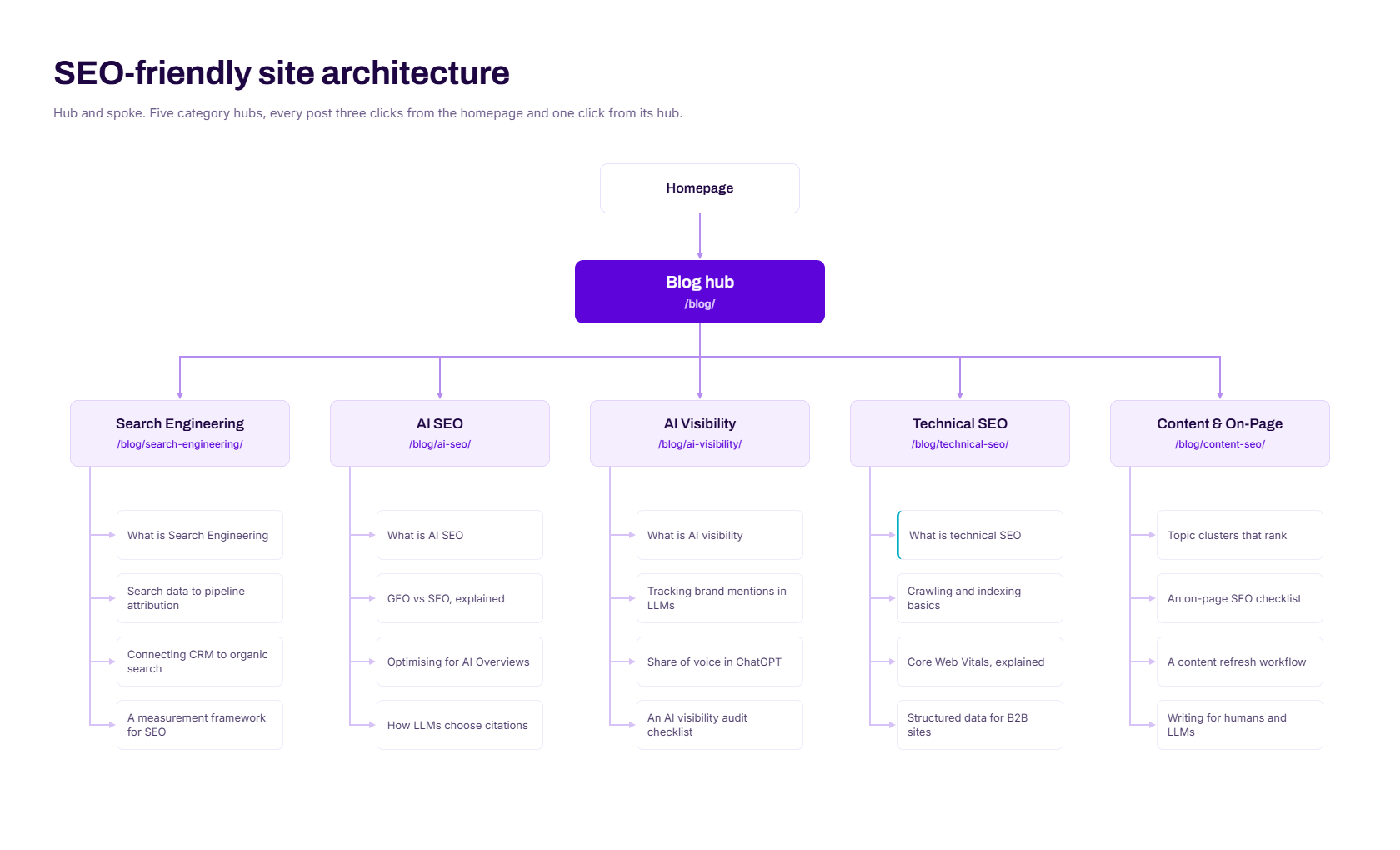
Where does technical SEO fit in your SEO strategy
Technical SEO covers the systems that deliver and organise your pages. On page SEO improves their content and page elements, including headings, explanations and titles. Off-page SEO concerns signals beyond your website, such as links from other sites.
The boundaries overlap. Internal links help people navigate, help crawlers discover pages and provide context about the destination.
How technical SEO works
Search engines need to process a page before considering it for a search result.
Here is a breakdown of the three key steps involved in how search engines process your website:
- Crawling happens when a crawler, such as Googlebot, fetches a page. Links and sitemaps help it discover URLs.
- Rendering builds the page from its code and resources. JavaScript may add content during this stage.
- Indexing involves analysing content and storing information about it in the search index. Google also selects a representative URL when several pages contain substantially similar information.
Meeting the technical requirements makes a page eligible for indexing. Google does not promise to index every eligible page, and indexing does not guarantee a strong ranking.
Why is technical SEO important?
Search engines need to discover a page, access its content and decide whether to include it in their index before it can appear in search results. Technical problems can interrupt that process even when the page contains useful information.
Consider an industrial equipment manufacturer that publishes detailed maintenance service pages. A website update accidentally adds a directive telling search engines not to index those pages. Customers can still open them through direct links, but the pages can disappear from search results once search engines process the change.
Marketing teams could respond by rewriting the copy or publishing more articles, yet neither action would resolve the indexing restriction. Technical SEO helps identify the actual barrier so the team can address it.
Its importance also extends to routine website decisions. Changes to navigation, page templates, URLs or hosting can affect how search engines access the site. Including technical SEO in those decisions helps protect the pages that support customer enquiries.
Benefits of technical SEO
Technical SEO gives businesses greater control over how their website is discovered, maintained and used. The benefits depend on which problems exist and how effectively they are resolved.
- More reliable access to priority pages
Fixing crawl restrictions, broken links and indexing errors helps search engines reach important service and product pages. Eligible pages can appear for relevant searches, although indexing and rankings remain subject to search engine decisions.
- A better experience for potential customers
Faster-loading pages and stable layouts make it easier to read specifications, compare services, and complete enquiry forms. Improvements remove avoidable friction, while the quality of the offer and content still influences whether someone enquires.
- Fewer problems during website changes
Checking redirects, internal links and indexing settings during a redesign helps preserve access to established pages. Teams can catch errors before they affect an entire service category.
- Clearer priorities for development work
A technical review connects website issues to the pages and journeys they affect. Marketing and development teams can prioritise a blocked service page over a minor warning on an outdated article, directing effort toward problems with meaningful business consequences.
7 technical SEO best practices
Below are seven essential best practices to ensure your website is properly optimized for search engines:
1. Give important pages clear routes through your website
Link service pages from relevant navigation, category pages and supporting articles. A calibration service should be reachable from the services section and related guidance about the equipment it covers.
An orphan page has no internal links pointing to it. Compare your published URL inventory with a website crawl to find pages that navigation misses.
Use ordinary HTML links with a destination URL. A button that loads another page only through a script may not provide the same reliable discovery path.
Maintain an XML sitemap, a file listing the preferred URLs you want indexed. Keep it updated as pages change, and submit it through Google Search Console. A sitemap supports discovery but does not guarantee indexing.
2. Separate crawling controls from indexing instructions
A robots.txt file tells compliant crawlers which URLs they may request. A noindex instruction tells a supporting search engine to keep a page out of its index.
Google must be able to crawl a page to see its noindex instruction. Blocking the same page in robots.txt can prevent Google from reading that instruction.
Inspect important URLs in Search Console. Check whether crawling and indexing are allowed, whether Google fetched the page successfully and which page version Google selected.
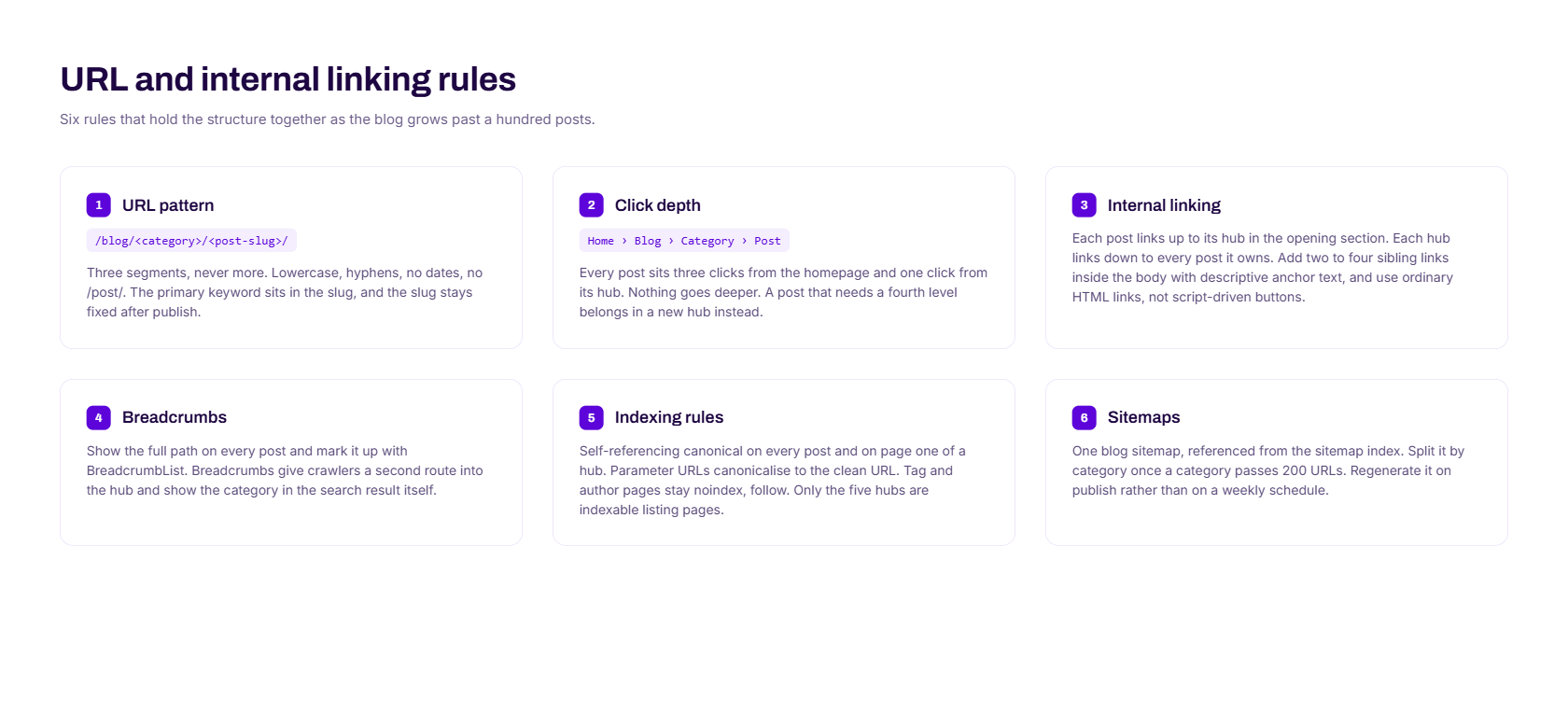
To maintain a clean site architecture as your content expands, follow these six core standards for URL structure and internal linking
Remove accidental restrictions from public service pages. Keep intentional exclusions where appropriate, such as confirmation pages after a form submission. Protect confidential content with access controls, since search instructions do not secure it.
3. Check what search engines can render
Google can execute JavaScript, but blocked resources or failed scripts can prevent content from appearing correctly.
Use URL Inspection to compare the tested page with the page visitors see. Check the main heading, service details and navigation links. A successful fetch alone does not establish that all essential information appeared.
If important content depends on fragile scripts, discuss rendering it on the server with your developers. Server rendering supplies the content in the initial HTML response, reducing reliance on scripts running successfully afterwards.
Avoid requiring a click or swipe to load the primary content you want Google to index.
4. Keep duplicate URLs consistent
A service page may be available through its normal address and a version with tracking parameters. A canonical tag identifies your preferred version when the content is duplicate or substantially similar.
Google treats that preference as a signal, rather than an instruction it must follow.
Point internal links and sitemap entries to the preferred URL. Avoid contradictory signals, such as listing one version in the sitemap while declaring another canonical.
Keep genuinely different service pages separate. Pointing every service page to a broad category page can undermine the distinction you intended each page to make.
5. Handle moved and missing pages properly
An HTTP status code describes the server’s response to a request. A working page generally returns 200. A missing page returns 404, while a 301 or 308 redirect signals a permanent move.
When a service page moves, redirect its old URL directly to the relevant replacement and update internal links. Avoid routing visitors through several successive redirects.
A permanently removed page without a suitable replacement can correctly return 404 or 410. Redirecting every deleted page to the homepage creates an irrelevant destination.
Serve pages over HTTPS, which encrypts the connection, and direct HTTP versions to their secure equivalents. Include redirects and indexing controls in release checks whenever the website changes.
6. Improve mobile usability and Core Web Vitals
Google uses the mobile version of content for indexing and ranking. Preserve essential information and structured data on mobile, even when the layout changes.
Test whether visitors can read specifications, navigate between services and complete enquiry forms on a phone.
Core Web Vitals measure three aspects of page experience:
Assess these thresholds at the 75th percentile of visits, separately for mobile and desktop. In practical terms, at least 75% should meet each target.
Use PageSpeed Insights to separate field data from actual users and laboratory diagnostics from a simulated test. Reduce oversized images, unnecessary scripts, and layout shifts based on the problems you identify.
A perfect test score does not guarantee higher rankings.
7. Use structured data that reflects the page
Structured data, also called schema markup, labels information in code so search engines can interpret it more explicitly.
Choose markup that fits the content, such as organisation information or breadcrumb navigation. Keep it consistent with what visitors can see.
Test supported markup with Google’s Rich Results Test. A valid result can support eligibility for enhanced search results, but it does not guarantee their appearance or an AI citation. Adding irrelevant markup to obtain a more prominent listing creates avoidable problems.
Prioritise the pages and problems that matter
Start an audit with your important services, product categories and pages already generating relevant enquiries.
A server error affecting every service page deserves attention before a minor issue on an old announcement. A faulty template affecting hundreds of URLs may justify more effort than an isolated warning.
Give each recommended fix an affected URL set, a business reason, an owner and a verification method. Developers need enough detail to reproduce the problem and know when it is resolved.
Treat the number of warnings as diagnostic information. The most useful priority depends on what the issue prevents and which pages it affects.
Measure fixes and business results separately
Record the affected URLs and release date. Recrawl them to confirm the change, then use Search Console to check how Google processes the updated pages.
Track indexing status, relevant impressions and clicks for those URLs. Review organic landing page enquiries in analytics and check lead quality and sales outcomes in your customer relationship management (CRM) system.
Clicks are not enquiries, and enquiries are not revenue. Compare equivalent periods and record other changes, including content updates or seasonal demand. A traffic increase after a technical release does not, by itself, prove that the release caused it.
How FTA connects technical work to business priorities
FTA’s Search Engineering service connects organic search measurement with AI citations and pipeline attribution, including CRM connections to understand which pages contribute to opportunities.
Our Apex Group technical SEO engagement shows how technical work can be organised. The team crawled the site, prioritised issues affecting access, indexing and page experience, and implemented fixes within a three-week sprint.
The reported health score increased from 55 to 77 within two weeks. Those 22 points measured technical progress against the audit’s criteria. They should not be presented as a corresponding increase in rankings, enquiries or revenue.
Make search readiness part of publishing
The calibration company had already invested in expertise, copy and a website. An indexing instruction prevented its service pages from being considered for search.
Fixing that instruction protects the usefulness of work already funded. Search readiness belongs in publishing approval, with someone responsible for verifying it.
A page opening in a browser proves that a visitor can load it. Marketing teams also need evidence that search engines can access and interpret the information they expect customers to find.
Frequently asked questions
Do you need coding skills to manage technical SEO?
You can review Search Console and identify priorities without writing code. Changes to server settings, page templates, or JavaScript usually require development support. Marketing should explain the affected pages and business need, while developers implement and test the fix.
How often should you run a technical SEO audit?
Match the frequency to how often the website changes. Check critical templates after releases, redesigns and migrations. Regular monitoring can flag emerging issues between broader audits. A frequently updated catalogue needs closer attention than a stable brochure website.
How long do technical SEO fixes take to show results?
A deployed fix can be tested immediately, but Google still needs to revisit and process affected pages. Recrawling can take days to weeks. Ranking or enquiry changes have no fixed timetable, and some useful technical fixes produce no measurable ranking increase.
Should a small website focus on the crawl budget?
Usually, access and indexing checks deserve attention first. Crawl budget describes what Google can and wants to crawl. Investigate it when evidence shows important pages are being missed, particularly where filters or automated pages generate large numbers of URLs.
Does technical SEO help with Google’s AI answers?
Yes. Technical SEO helps Google find, read and index your content so it can be considered for AI Overviews and AI Mode. Fixing crawl barriers, making important content accessible, and enabling search snippets support that eligibility. Google does not require special AI schema, and a technically sound page is not guaranteed to appear in an AI answer.

Do you want more traffic?