

TL;DR
- XML and HTML sitemaps serve different purposes. XML helps search engines find your pages. HTML gives visitors an organised set of links to explore.
- Your content determines what else you need. Image, video and news sitemaps provide additional details that help search engines discover those resources.
- Larger websites can organise several sitemaps through one index. A sitemap index points to those files, making them easier to manage.
- A useful sitemap reflects your current website. Include the preferred page URLs, keep update dates accurate and connect important pages through internal links.
- Submission is only the starting point. Google successfully reading your sitemap does not mean every page is indexed or appearing in search results.
Imagine your team publishes an industry report, three supporting articles and a webinar recording. The launch email links to every resource, but your website’s resource hub only links to the report.
A month later, the campaign ended. A potential buyer browsing your website may never find the webinar. Search engines may also miss the supporting articles if there are few links leading to them.
Publishing content is one part of the job. You also need to give people and search engines a clear route to find it.
A sitemap is an organised list of your website’s pages or resources. Depending on its format, it helps search engines discover content or gives visitors another way to navigate. It works alongside your menus and internal links.
Choosing the right sitemap type starts with what your website contains. A service website, a product catalogue and a growing webinar library will have different needs.
Which sitemap does your website need, what should it include, and how can you check whether it is doing its job?
What is a sitemap, and what does it do?
A sitemap lists website URLs or provides links to them. Depending on its format, it supports search engine discovery or human navigation.
An XML sitemap can also describe related images, videos and news articles. Search engines can use that information when deciding what to crawl.
Discovery, crawling and indexing are separate steps. Google can know a URL exists without crawling it immediately, and a crawled page may still remain outside its index. A sitemap does not guarantee indexing or rankings.
Its value increases on large websites, new domains with few external links, and sites where important media needs additional discovery support.
Why is a sitemap important?
Publishing a page does not automatically mean search engines will find it. Search engines usually discover content by following links, but new pages or resources buried deep within a website can be harder to reach.
A sitemap provides an additional way to discover those pages. It lists the URLs you want search engines to know about, helping them find content across your website.
For a B2B company, that could include a new service page, an industry report or a growing library of product documentation. As the website expands, a maintained sitemap helps ensure those URLs remain available for discovery.
Sitemaps are particularly useful for large websites and newer sites with few external links. They support discovery, but inclusion alone does not guarantee crawling or indexing. Clear navigation and relevant internal links remain essential.
What are the advantages of a sitemap?
The advantages of a sitemap depend on the format you use and your website's content. Here is how they can help:
- Help search engines discover new content
Adding new service pages, articles and resources to an XML sitemap gives search engines another route to find them. For a newer website with few incoming links, that additional route can be particularly useful.
- Communicate when important content changes
A page may keep the same URL even after its content has been substantially revised. Accurate lastmod dates help search engines identify those changes, whether you have updated a product specification or refreshed a research report.
- Provide more information about images and videos
A page URL alone does not describe every asset it contains. Image and video sitemap extensions provide additional information, such as the location of equipment photographs or the title, thumbnail and file address of a product demonstration.
- Help visitors navigate a complex website
An HTML sitemap gives people a browsable directory of useful pages. Grouping links under clear headings such as Solutions, Resources and Documentation can help visitors find information across a website with many sections.
What are the main types of sitemap in SEO?
XML and HTML are the two main categories commonly discussed. Image, video and news sitemaps extend XML for particular content. Google also accepts plain text files and supported feeds.
Understanding those distinctions prevents a common mistake: treating every sitemap label as a separate file your website must have.
1. XML sitemaps
An XML sitemap gives search engines a structured list of URLs. A B2B software company might include solution pages, integration pages, case studies and research articles.
Here is a simple SEO sitemap example for a website:
The urlset element contains the entries. Each url identifies a page, loc gives its full address, and the optional lastmod records when it changed.
Use the last significant update for lastmod. Changing a footer copyright date does not qualify. Google ignores the priority and changefreq values, so adding them will not make a commercial page rank higher.
2. HTML sitemaps
An HTML sitemap is a normal webpage with organised links. Visitors can browse its sections to find relevant content.
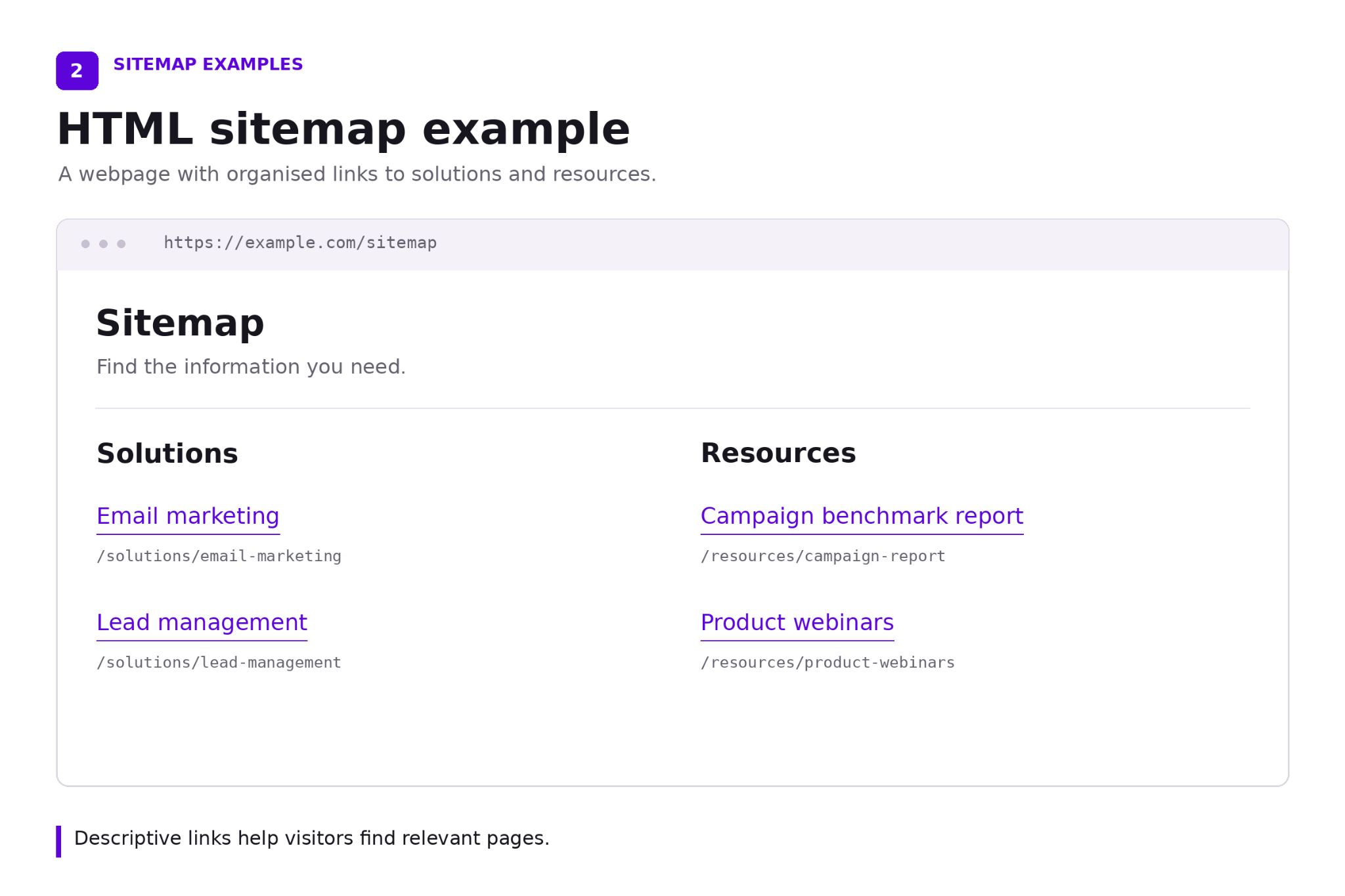
Use descriptive, clickable links built with standard HTML anchors. Google can follow those links too, although the page is designed primarily for people.
An HTML sitemap is useful when it genuinely simplifies navigation across a complex website. Clear menus, category pages and contextual links should still do the everyday work.
3. Image sitemaps
An image sitemap associates a page with its image URLs. It can help Google discover images that are harder to find through normal crawling, including some images loaded through JavaScript.
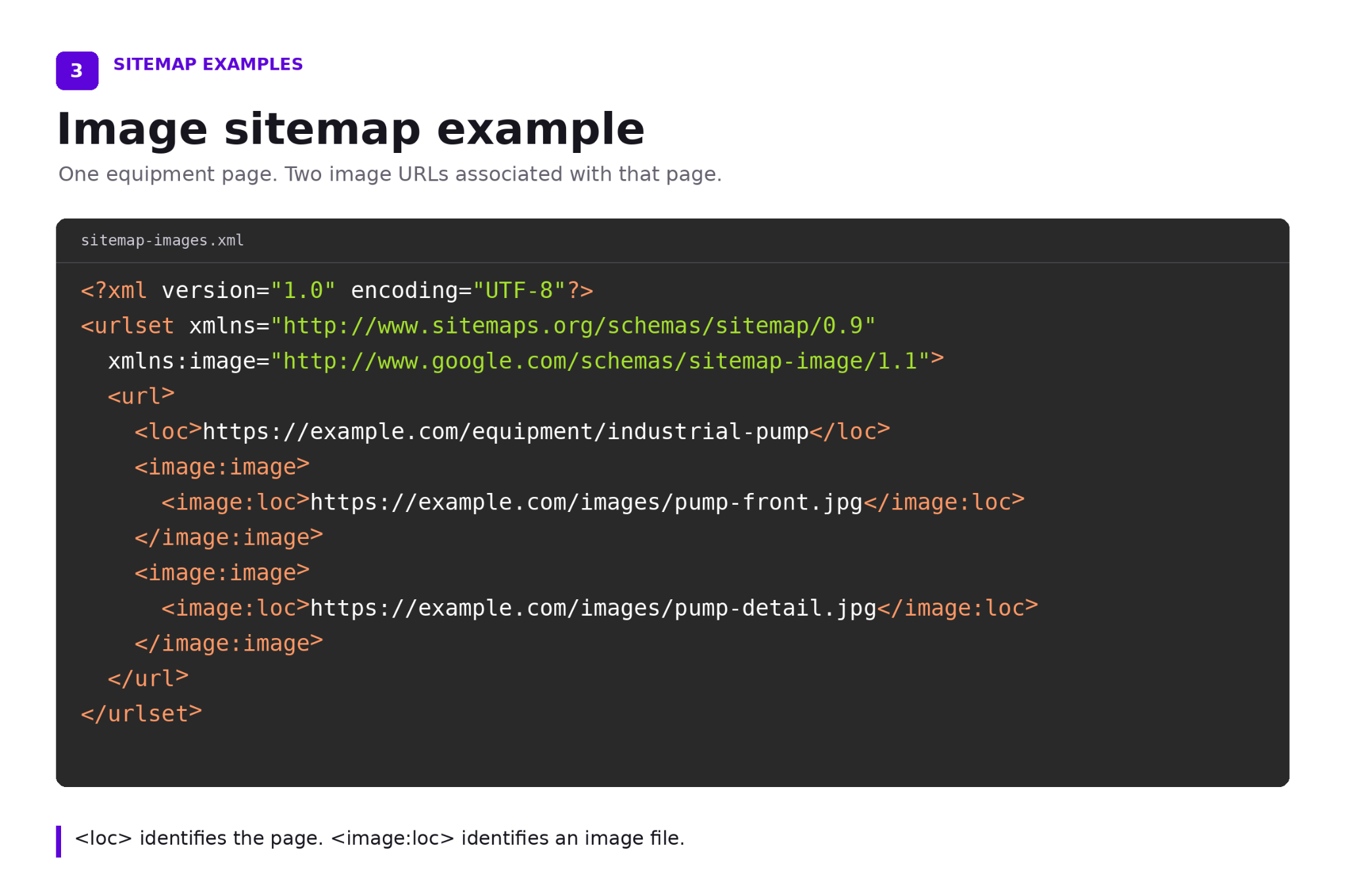
A manufacturer with detailed equipment photography may benefit more than a consultancy using decorative stock images.
Add image information to an existing XML sitemap or maintain a separate file. The essential extension tags are image:image and image:loc.
Google has deprecated older tags including image:caption and image:title. Avoid copying outdated templates that present them as current requirements.
4. Video sitemaps
A video sitemap adds details about videos embedded on your pages. Product demonstrations, training libraries and webinar recordings are relevant B2B examples.
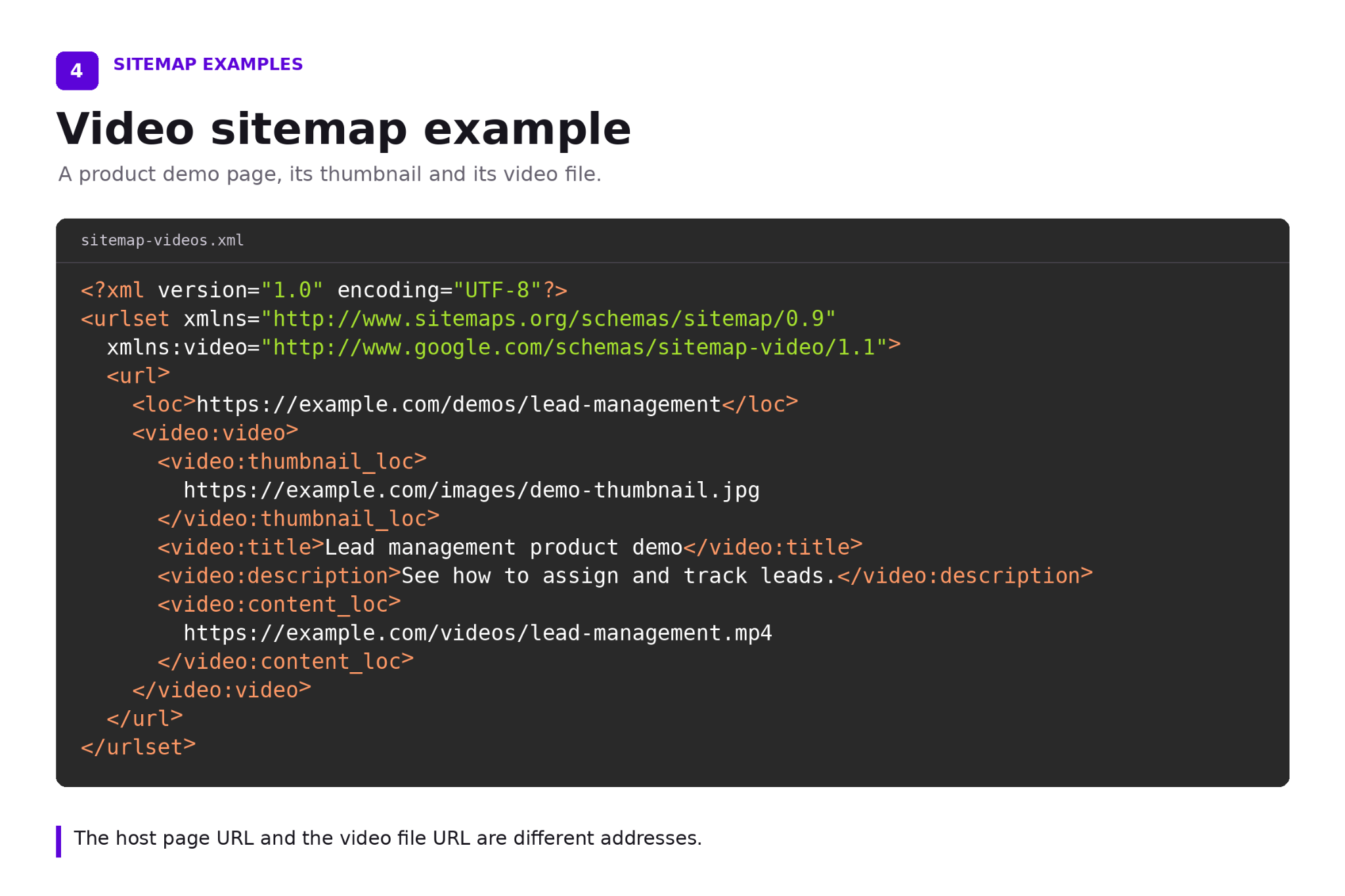
Alongside the host page URL, required video details include the title, description, thumbnail URL and either the video file URL or player URL.
The distinction matters: the page hosting a demo and the video file itself have different addresses.
Keep referenced res accessible to Googlebot and ensure the video is relevant to its host page. Adding an inaccessible recording to a sitemap will not remove its login barrier.
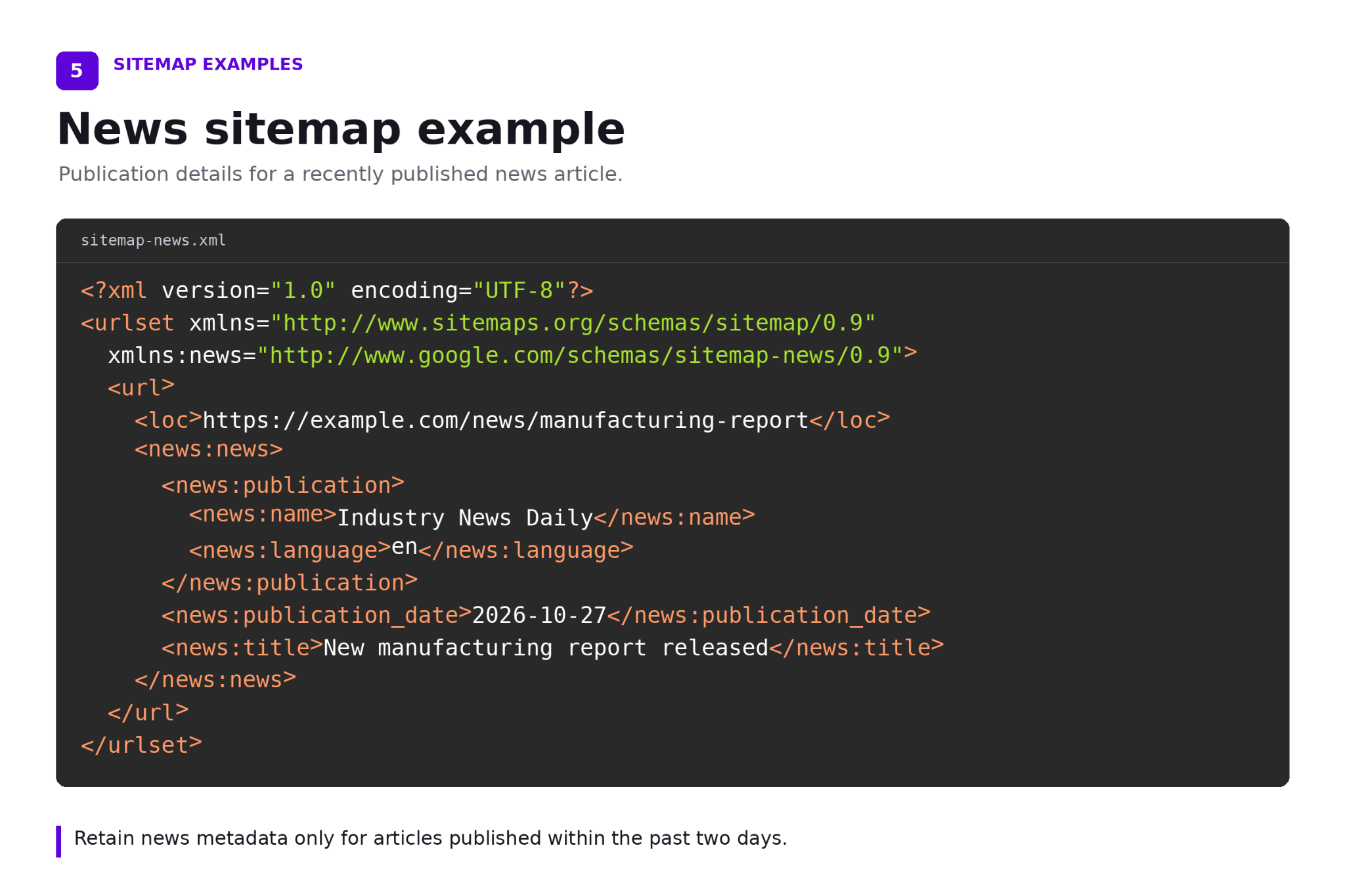
5. News sitemaps
A news sitemap supplies publication information for news articles, including publication name, language, title and publication date.
Only articles published within the previous two days should retain news metadata. Each file can contain up to 1,000 news entries.
Older articles can remain in your standard XML sitemap after their news metadata is removed. Update the existing news sitemap as articles are published.
Use this format for a genuine news publishing operation. A company blog does not need a news sitemap simply because its team publishes frequently.
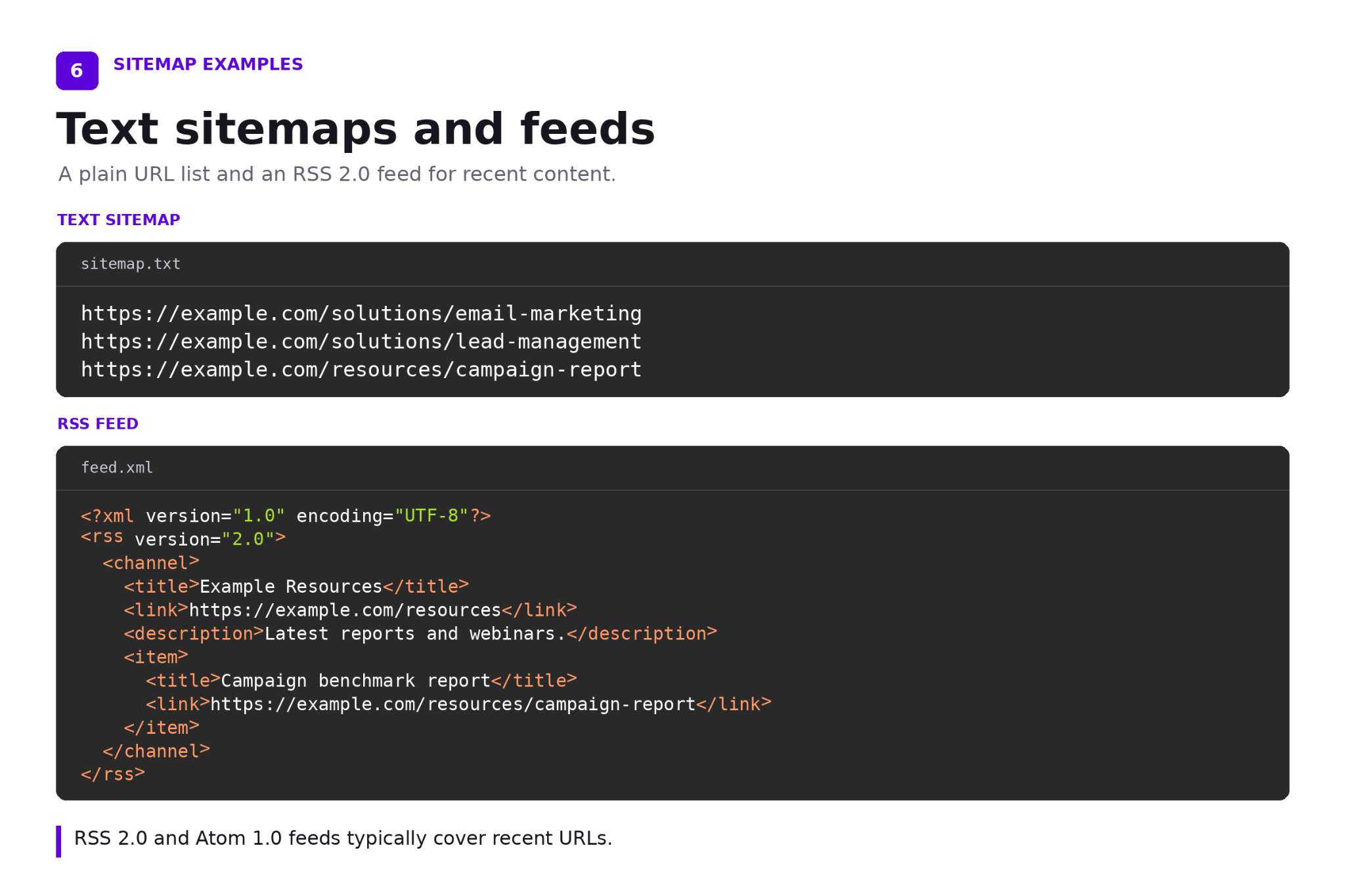
6. Text sitemaps and RSS or Atom feeds
A text sitemap contains one full URL per line. It suits a straightforward URL list but cannot carry image or news extensions.
Google also accepts RSS 2.0 and Atom 1.0 feeds. Feeds generally cover recent URLs, so they may leave an older re-library unrepresented.
Google has no preference among its supported formats. XML is often the practical choice because it accommodates additional content information as a website grows.
Where does a visual sitemap fit?
A visual sitemap is a planning diagram showing how sections and pages relate. Teams use it during a website build or redesign to agree on structure.
For example, marketing can map each industry page to supporting solutions and case studies before development begins. The diagram helps identify missing routes through the content.
It is a planning asset. Search engines still need accessible pages, crawlable links and an appropriate sitemap file.
How is a sitemap index different from a sitemap?
A sitemap lists content URLs. A sitemap index lists sitemap files.
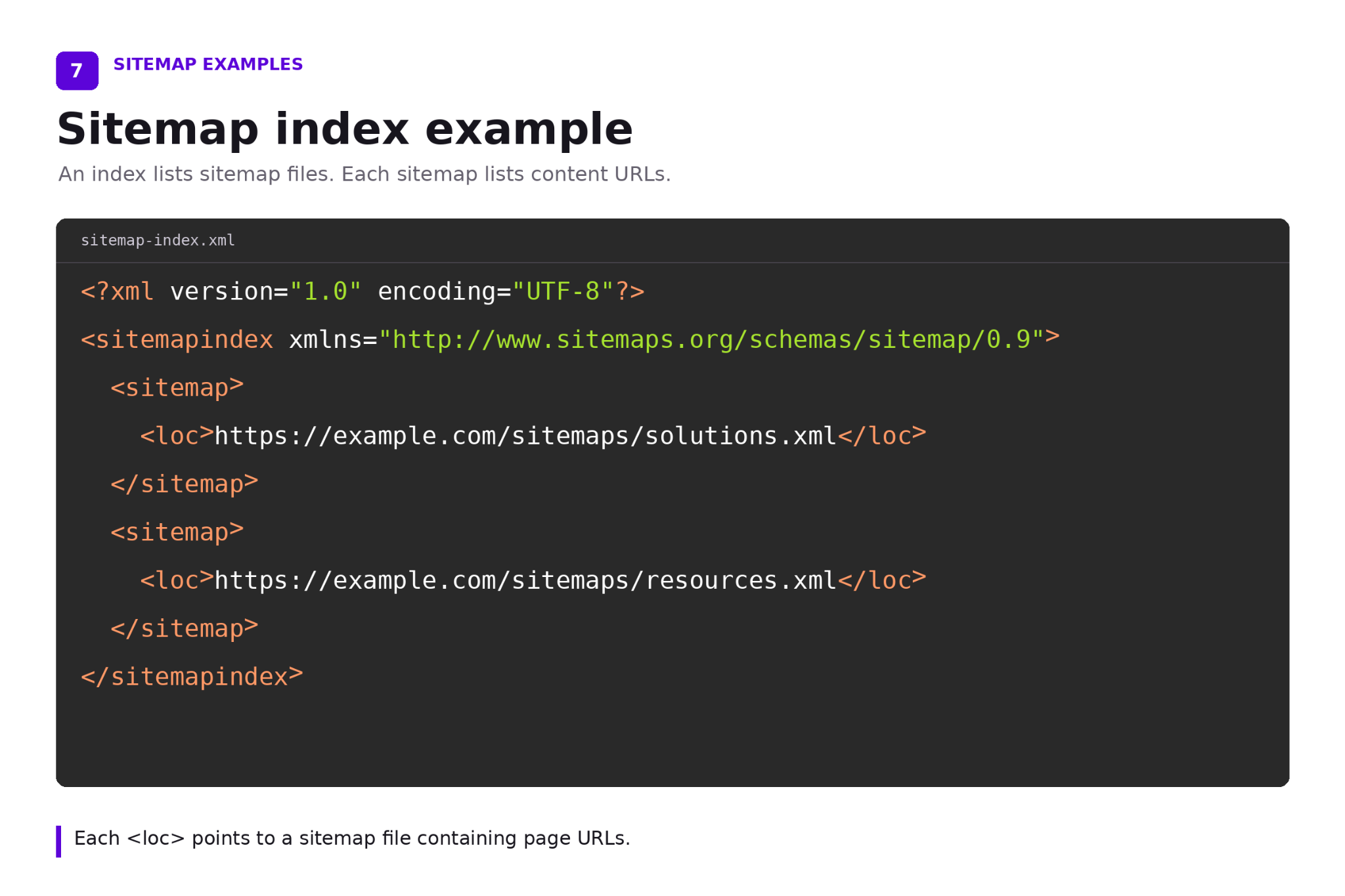
For a large B2B website, an index could point to separate files for solutions, res and documentation:
A single sitemap must stay within both limits: 50,000 URLs and 50 MB uncompressed. Split it when either limit is exceeded. An index lets you submit the resulting files together.
Smaller websites can also separate files for easier management. Creating additional sitemaps does not automatically improve search performance.
How do you create and submit a sitemap?
Start by checking whether your CMS already generates one. Common locations include /sitemap.xml, while robots.txt may identify its actual address.
For Webflow, go to Site settings, SEO, then Sitemap. Enable automatic generation, save and publish. Webflow updates the generated sitemap when you publish and adds its address to robots.txt.
Before submission, check a sample of commercial and editorial URLs. Confirm that recent additions appear and retired pages have been handled correctly.
Open the correct website property in Google Search Console, select Sitemaps and submit the sitemap or index URL. Review processing errors after submission.
Which sitemap mistakes should you fix first?
Review the entries against your actual publishing decisions. Start with these checks:
- Conflicting canonical URLs. Include the preferred version of each page. A sitemap pointing to one URL while the page declares another canonical sends inconsistent signals.
- Unwanted search pages. Keep drafts, internal search results and deliberately excluded campaign variants out of your search sitemap.
- Broken or redirected entries. For ongoing maintenance, replace obsolete URLs with their working final destinations where appropriate.
- Missing internal links. Keep a valuable orphaned page in scope and add relevant links to it. Deleting its sitemap entry alone does not solve the underlying problem.
- Invented freshness. Avoid resetting every modification date whenever a file is regenerated. Update dates should describe meaningful page changes.
Check indexing controls too. A noindex directive tells Google to exclude a page once it reads that directive. Sitemap inclusion does not override it.
A robots.txt block controls crawling and can prevent Google from seeing noindex. Treat the two controls separately when investigating why a page is missing or still appearing.
Assign ownership for fixes. A content editor can improve internal links, while a developer may need to correct how the CMS generates URLs.
How do you know whether your sitemap is working?
A Success status in Search Console means Google fetched and processed the file. Discovered pages are the URLs parsed from it, rather than a count of indexed pages.
Filter the Page indexing report by sitemap to investigate coverage. Inspect important URLs individually when the report shows unexpected exclusions.
For a marketing team, review three separate outcomes: whether priority pages are included, whether eligible pages are indexed, and whether those pages earn relevant impressions and inquiries.
Compare equivalent periods after changes, while allowing for other website updates. A rise in traffic alone cannot establish that a sitemap change caused it.
FAQs
Does a small B2B website need an XML sitemap?
A small, well-linked website may be discoverable without one. Google describes small as roughly 500 pages or fewer. Maintaining a CMS generated sitemap is still practical when pages are added regularly.
Do responsive websites need a separate mobile sitemap?
No. Responsive pages use the same URLs across devices. Maintain the normal sitemap and check that important content and links remain accessible on mobile.
Can a sitemap identify different language versions?
Yes. XML sitemaps can include hreflang annotations connecting language and regional variants. Each URL entry should identify all its alternates, including itself. Listing translated URLs without those annotations does not establish their relationship.
Should paid campaign landing pages be included?
Include a landing page when it offers distinct, useful content intended for organic search. Exclude deliberately nonindexable test variants and duplicate campaign URLs. Make the decision from the page’s purpose, rather than the fact that an advertising campaign uses it.
Do Google’s AI features require a different sitemap?
No special sitemap is required for AI Overviews or AI Mode. Google applies its existing search requirements. Eligible pages must be indexed and able to appear with a snippet. Sitemap inclusion alone does not secure an AI citation.
How can you make your sitemap more useful?
A useful sitemap gives search engines a clear view of the content you want discovered. Choose the format that suits your website, include your preferred URLs and keep the file accurate as pages change. Support it with internal links, then use Search Console to investigate indexing gaps. The goal is to help your important pages get found, with sitemap submission serving as one step in that process.

Do you want more traffic?


How AI Shortlists CROs for US Biotech Buyers?